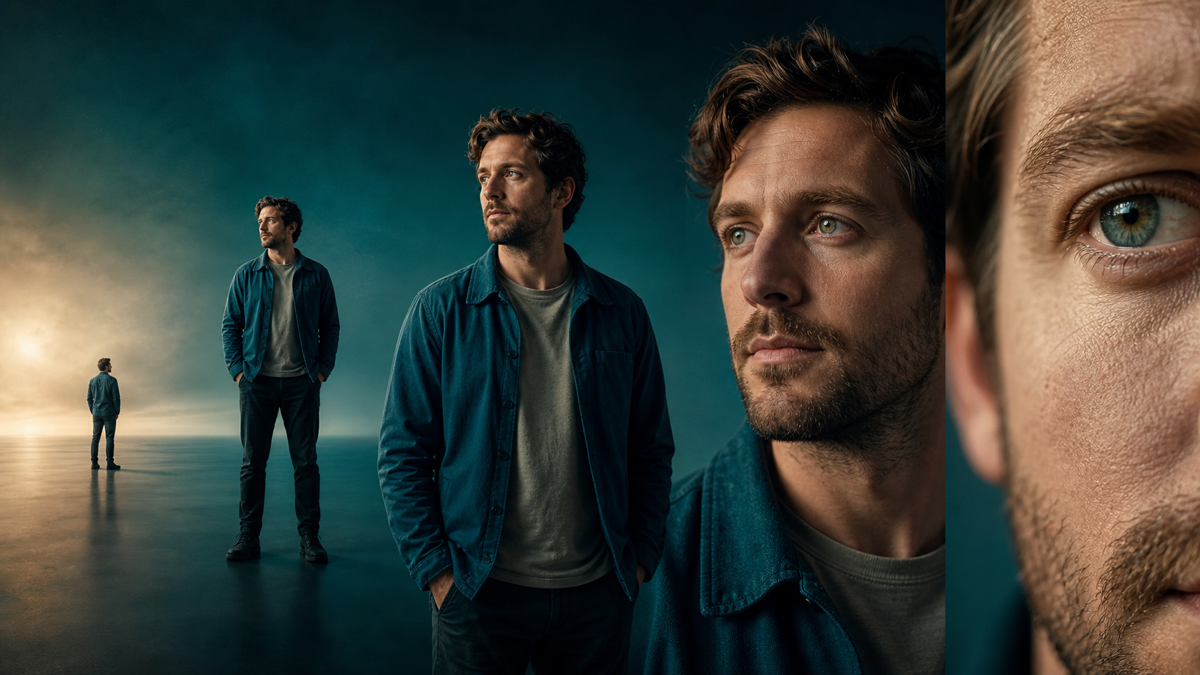
A camera prompt becomes much more reliable when it separates two decisions: shot size determines how much of the subject and environment is visible, while camera angle determines where the viewer is positioned relative to that subject.
“Cinematic portrait” leaves both decisions open. “Eye-level medium close-up, shoulders visible, camera two metres away, subtle push-in” gives an image or video model a usable production instruction.
Shot Size versus Camera Angle
Shot size is mostly about distance and framing. Camera angle is about viewpoint.
shot size = how much we see
camera angle = where we see it from
camera movement = how the viewpoint changes over time
Keep the terms separate in a prompt. A low-angle close-up and a low-angle extreme long shot can communicate very different things.
Shot-Size Glossary
Extreme long shot
The environment dominates and the person may appear small. Use it to establish geography, scale, isolation or danger.
Prompt pattern: extreme long shot of [subject] within [large environment], full location visible, subject occupies less than ten percent of frame, [angle], [lighting]
Long shot or wide shot
The subject’s full body and surrounding action are readable. This is useful for movement, blocking and spatial relationships.
Prompt pattern: full-body long shot of [subject performing action], feet visible, environment provides context, [camera height], [lens character]
Medium long shot
The frame usually includes the subject from roughly the knees upward. It balances gesture with environment and works well for conversation, movement and character introduction.
Prompt pattern: medium long shot, knees-up framing, [subject], readable hand gesture, [setting], eye-level camera
Medium shot
The subject is commonly framed from the waist upward. A medium shot preserves body language while making expression easier to read.
Prompt pattern: waist-up medium shot of [subject], hands visible, [emotion tied to event], [background relationship]
Medium close-up
The head and upper torso fill most of the frame. It is useful for dialogue, reactions and restrained emotion without losing all bodily context.
Prompt pattern: medium close-up, chest-up framing, [subject looking toward object or person], controlled expression, shallow depth of field
Close-up
The face or an important object dominates. Close-ups direct attention and make small changes meaningful.
Prompt pattern: close-up of [face or object], frame filled by [important detail], precise focus on [feature], background secondary
Extreme close-up
Only a detail remains: an eye, mouth, hand, control, wound or object surface. Use it when the detail changes the viewer’s understanding.
Prompt pattern: extreme close-up of [specific detail], macro-level texture, no wider context, [lighting cue], [narrative purpose]
Common Camera Angles
Eye level
The camera meets the subject without imposing obvious hierarchy. It often feels observational or conversational.
High angle
The camera looks downward. It can reveal layout or make a subject appear constrained, but meaning depends on context. A high angle is not automatically “weakness.”
Low angle
The camera looks upward. It can emphasize height, threat, aspiration or architecture. Again, the story determines the meaning.
Bird’s-eye or overhead view
The camera looks almost vertically down. This converts bodies and objects into a spatial pattern and is helpful for choreography, geography and systems.
Dutch angle
The horizon is intentionally tilted. Use it sparingly to create imbalance or instability; it should correspond to a story condition rather than decorate every dramatic scene.
Over-the-shoulder shot
The camera frames one subject beyond the shoulder of another. This preserves spatial relationship and can shift identification during dialogue.
Point-of-view shot
The camera approximates what a character sees. State whose viewpoint it is and what information becomes available from that position.
A Reusable Prompt Formula
Build prompts in a fixed order:
[shot size] + [camera angle] + [subject and action]
+ [environment and spatial relation] + [lens/focus]
+ [lighting] + [allowed movement] + [invariants]
Example:
Eye-level medium close-up of Mara as she recognizes the damaged relay in her hand, shoulders tense but expression restrained, archive shelves receding behind her, 50 mm lens character, shallow depth of field, cool practical light, slow camera push-in, preserve wardrobe and room layout.
This prompt says more than “sad woman in a cinematic archive.” It connects framing to perception and gives the emotion a cause.
Avoid Prompt Cannibalization
Do not stack contradictory directions such as “extreme long shot, close-up portrait.” Decide what the shot must reveal. If the environment and expression are both essential, split the moment into two shots.
Model-specific pages can demonstrate how a particular generator interprets a shot. Generic definitions belong in one canonical glossary so that readers—and search engines—do not have to choose among dozens of nearly identical pages.
Use Shot Changes as Story Changes
A sequence should not change shot size merely for variety. Move closer when information becomes private, emotionally important or newly understood. Move wider when geography, consequence or separation matters.
For a more narrative treatment, see shot distance and emotion and camera angles and power .