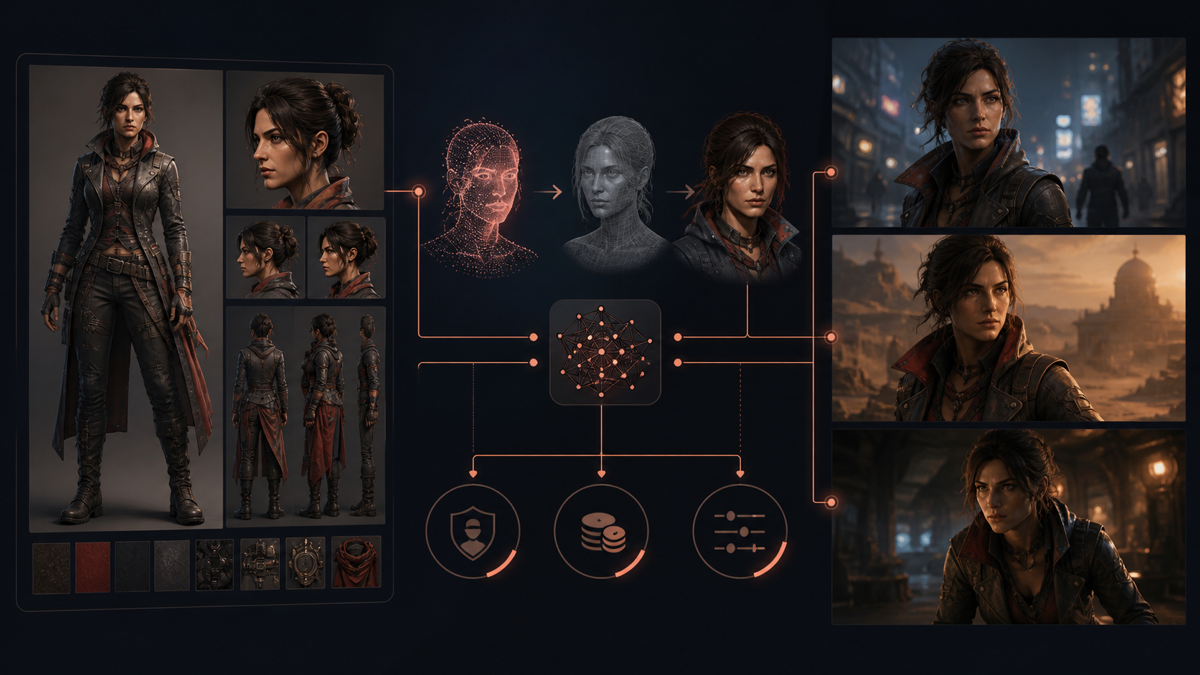
Scenario is best understood as a production layer around multiple generative models rather than one image generator. It combines a model library, custom character and style training, editing, asset management, node-based workflows and an API.
That breadth is useful only if it improves a real production constraint. This review therefore focuses on repeatability, integration and cost—not on whether one showcase image looks impressive.
The Short Verdict
Scenario is a strong fit for teams that repeatedly need the same characters, art direction, props or materials across many assets. Custom models, shared workflows and API access can turn an unstable prompt process into a reusable production capability.
It is a weaker fit for someone who wants a few unrelated images and has no stable visual system to encode. In that case, direct access to a foundation model may be simpler.
The important qualification is that “consistent” does not mean automatic approval. A custom model can reduce variance while still producing anatomy, costume, pose or object errors. Dataset preparation and review remain part of the cost.
What Scenario Provides
Scenario’s current platform spans image, video, 3D and audio generation. Its production proposition includes:
- access to multiple foundation and editing models;
- training for character, style and transformation models;
- model composition and LoRA merging;
- prompt-based editing, inpainting, outpainting and enhancement;
- projects, tags, collections and searchable asset history;
- visual workflow nodes; and
- REST API and SDK integration.
The platform remains model-dependent. Results, settings and cost vary with the selected engine. A review should therefore distinguish Scenario’s orchestration layer from the underlying model family.
Character Consistency: The Main Test
Scenario recommends a curated set of high-resolution reference images for custom character training. Its documentation emphasizes consistent defining features combined with varied poses, expressions, camera distances and backgrounds.
That trade-off matters. Repetition teaches the model identity, but too little variation can bind the character to one pose or environment.
A useful evaluation set contains prompts that were not represented directly in training:
- front, profile and three-quarter views;
- close-up, medium and full-body framing;
- neutral, restrained and strong expressions;
- indoor, outdoor, bright and low-key lighting;
- recurring costume details and props; and
- interaction with another character or object.
Score each output separately for face, body proportions, hair, signature clothing, prop geometry and overall style. A single “looks similar” score hides the failure mode.
A Better Consistency Benchmark
Do not cherry-pick the best image from a large batch. Run the same prompt and settings several times and record the acceptance rate.
usable output rate = approved outputs / total generated outputs
Then calculate intervention cost:
effective asset cost = generation credits
                     + review time
                     + correction time
                     + rejected generations
A custom model is valuable when it raises the usable-output rate enough to offset training, curation and maintenance.
Training Workflow
A practical character-model workflow is:
- Define which attributes constitute identity.
- Remove contradictory or low-quality reference images.
- Include controlled variation in pose, expression and framing.
- Train and compare checkpoints or epochs with fixed test prompts.
- Select the model version based on production tests, not the most flattering portrait.
- Version the dataset and record which assets may legally be used for training.
- Retest after model or workflow changes.
Scenario’s epoch comparison is useful because the final training step is not automatically the best checkpoint. Overtraining may reduce flexibility or bind irrelevant details too strongly.
Pricing and Real Cost
As of August 2026, Scenario lists monthly Starter, Pro and Max plans at $15, $45 and $75 respectively, with different monthly credit allocations and features. Custom model training begins on the Pro tier, while team and monitoring features expand at higher tiers. Prices and inclusions can change; verify the current pricing page before purchase.
Credits are only one part of cost. Higher-resolution generations, premium models, video, 3D and training consume different amounts. Credits also do not roll over according to the current FAQ.
Before choosing a plan, run a representative week:
- number of assets requested;
- generations per approved asset;
- model and resolution used;
- training frequency;
- correction time; and
- team seats and storage.
Convert that workload into cost per approved production asset, not cost per generation.
API and Workflow Value
Scenario becomes more distinctive when a team needs repeatable pipelines. A visual node graph and API can connect generation, editing, enhancement and delivery rather than treating each result as an isolated prompt session.
The API does not remove the generative black box. It makes the surrounding process explicit: inputs can be versioned, outputs logged, validation inserted and approved assets routed into a game or content pipeline.
That is a meaningful architectural advantage when the organization owns the workflow state and can replace an underlying model without losing the complete production process.
Strengths
- Custom training is integrated with generation and editing.
- Character and style models support recurring visual systems.
- Multiple underlying models reduce dependence on one generator.
- Projects, tags and shared models help teams manage accumulated assets.
- API and workflow nodes support automation beyond manual prompting.
Limitations and Risks
- Quality depends heavily on dataset curation and the chosen base model.
- Credit comparisons are difficult when models and media have different costs.
- “Consistency” still requires a defined acceptance rubric and human review.
- A broad platform can be unnecessary overhead for one-off generation.
- Teams must manage rights and provenance for uploaded training material.
- Model updates can change output distributions, requiring regression tests.
Who Should Use It?
Scenario is most compelling for game, story, brand and marketing teams with recurring characters or a stable art direction. It also suits developers who want generation inside a larger asset pipeline.
Solo creators should test the free allowance with a real mini-project before subscribing. Generate the same character across ten deliberately difficult conditions and count usable results. That experiment will reveal more than a showcase gallery.
The final question is not “Can Scenario make a good image?” Many tools can. It is:
Can this workflow produce approved assets repeatedly, at a predictable cost, without losing the production’s visual identity?