
The seed is an integral part of the usage of stable diffusion; it is like an identity to a generated image. The question is: Is the seed always creating the same image?
What is Seed in Stable Diffusion?
Seed is an attribute used to generate images with Stable Diffusion. Seed influences how the image is generated. The usual expectation is that a Stable Diffusion seed is behaving deterministically.
Deterministically in that sense, means that if all settings :
- classifier free guidance scale / cfg scale
- text prompt
- image prompt (and weight)
- model version
- steps
- scheduler
are the same, and the seed is the same. The image will always be the same. In other words: you can reproduce the image repeatedly if the settings are the same.
Expectation
The seed parameter is important for achieving image style consistency, which is also discussed here .
Seed in Stable Diffusion is a number used to initialize the generation. No need to come up with the number yourself, as it is randomly generated when not specified. But controlling the seed can help you generate reproducible images, experiment with other parameters, or prompt variations.
The most important thing about seed is that generations with the same parameters, prompt, and seed will produce precisely the same images. Thanks to that, we can generate multiple similar variations of the picture. Let’s look up some examples. Source
So the expectation is: same parameters, settings, prompt, and the seed will produce precisely the same images
Observation
Using Stable Diffusion from Stability AI Dreamstudio or via replicate could be observed that sometimes the images are not the same, even if all settings are the same. The question is, why?
As mentioned before, the expectation is that the result will always be identical if all settings are identical. This is relevant to being able to control the style of an image, for example, to achieve style consistency.
Note: Some Schedulers like EulerAncestral might ignore the seed value , as well
With the latest version (May 2023), Stability AI dramatically changed the UI of Dreamstudio; you cannot set the scheduler anymore. However, you can set the scheduler using Stability AI’s API.
Comparing Images
Fortunately, this can be tested using different settings and observing which settings might influence the behavior of the seed. To test if the images generated with Stable Diffusion are the same, you can use the following:
- Photoshop
- Python Pillow Package
The idea is to get a clear idea if and how the images differ because it might not be reliable to rely on visual inspection only.
Using Photoshop to Compare Images
To compare two images in Photoshop, open both files in the program and go to the “Window” menu. Select “Arrange” and then “New Window for [name of the image].” This will open both images side-by-side in separate windows. Source
Using Python Pillow Package to compare Images
The ImageChops sub-module from the Pillow has the difference function, which calculates the absolute difference between two images using Stable Diffusion .
Result
Surprise. Sometimes the result is the same, and sometimes it is not. Using the same settings with the same prompt will only result in the same image without clip guidance.
The clip guidance of stable diffusion is weakening the seed.
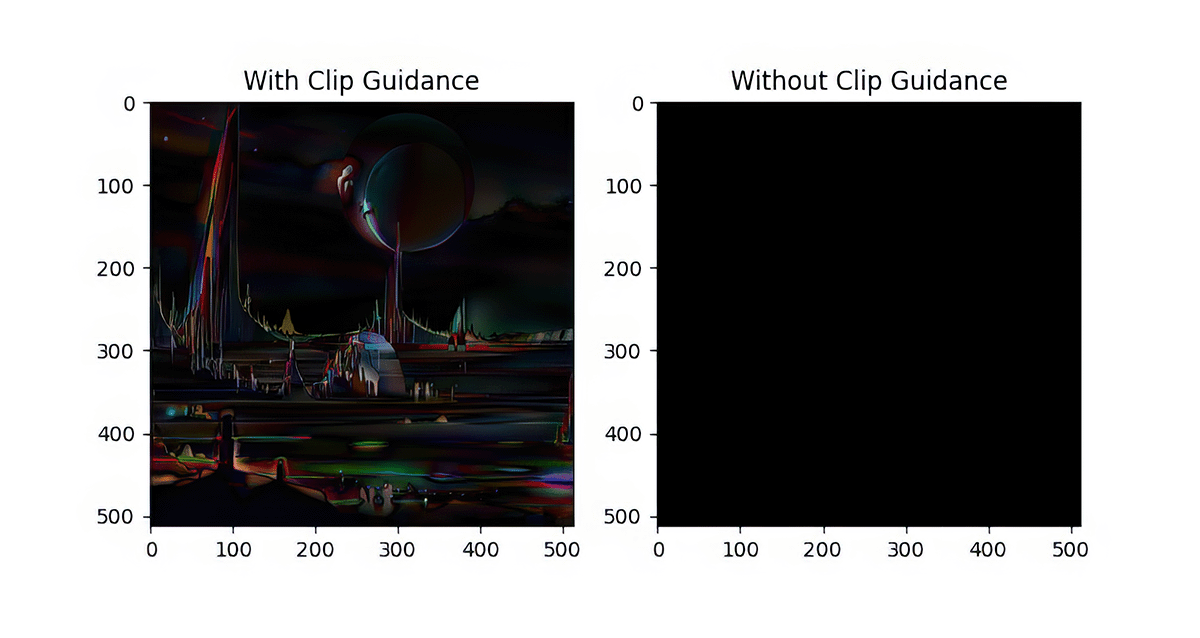
With CLIP:

Without CLIP:

Setup
Settings
Settings used to create the images:
{
    "width": 512,
    "height": 512,
    "cfg_scale": "20",
    "steps": 30,
    "number_of_images": 1,
    "model": "Stable Diffusion v2.1-768",
    "sampler": "k_euler",
    "seed": 909090,
    "prompt": "A dream of a distant galaxy, concept art, matte painting, HQ, 4k"
}
Code
ImageChops.difference(_im1, _im2)The complete Python Code (derived from here) :
from PIL import Image, ImageChops
import matplotlib.pyplot as plt

# source: https://stackoverflow.com/questions/189943/how-can-i-quantify-difference-between-two-images

# Renderer:
# https://beta.dreamstudio.ai/dream

_image_path = '../reference'

_settings = {
'width': 512,
'height': 512,
'cfg_scale': '20',
'steps': 30,
'number_of_images': 1,
'sample': 'k_euler',
'model': 'Stable Diffusion v2.1-768',
'prompt': 'A dream of a distant galaxy, concept art, matte painting, HQ, 4k'
}

_clip_result_files = [
"909090_A_dream_of_a_distant_galaxy__concept_art__matte_painting__HQ__4k_a_w_clip.png",
"909090_A_dream_of_a_distant_galaxy__concept_art__matte_painting__HQ__4k_b_w_clip.png"
]

_wo_clip_result_files = [
"909090_A_dream_of_a_distant_galaxy__concept_art__matte_painting__HQ__4k_a_wo_clip.png",
"909090_A_dream_of_a_distant_galaxy__concept_art__matte_painting__HQ__4k_b_wo_clip.png"
]


def compare_images(path, images: [str]):
# compare images with clip guidance
_im1 = Image.open("{}/{}".format(path, images[0]))
_im2 = Image.open("{}/{}".format(path, images[1]))

# Returns the absolute value of the pixel-by-pixel difference between the two images.
return ImageChops.difference(_im1, _im2)


_results = [{
'title': "With Clip Guidance",
'image': compare_images(_image_path, _clip_result_files)
}, {
'title': "Without Clip Guidance",
'image': compare_images(_image_path, _wo_clip_result_files)
}]

print(
"Difference with CLIP: {}".format(compare_images(_image_path, _clip_result_files).getbbox())
)

_figure = plt.figure(figsize=(8, 8))
_columns = 2
_rows = 1

for i in range(0, _columns * _rows):
_image_result = _results[i]
_ax = _figure.add_subplot(_rows, _columns, i + 1)
_ax.title.set_text(_image_result['title'])

plt.imshow(_image_result['image'])

plt.show()
Conclusion
Depending on Clip Guidance and the Scheduler, the seed might be deterministic.
Generated image quality from generated images depends on how you use open-source stable diffusion, either using the UI from Dreamstudio, Stability AI’s API, or your model.